
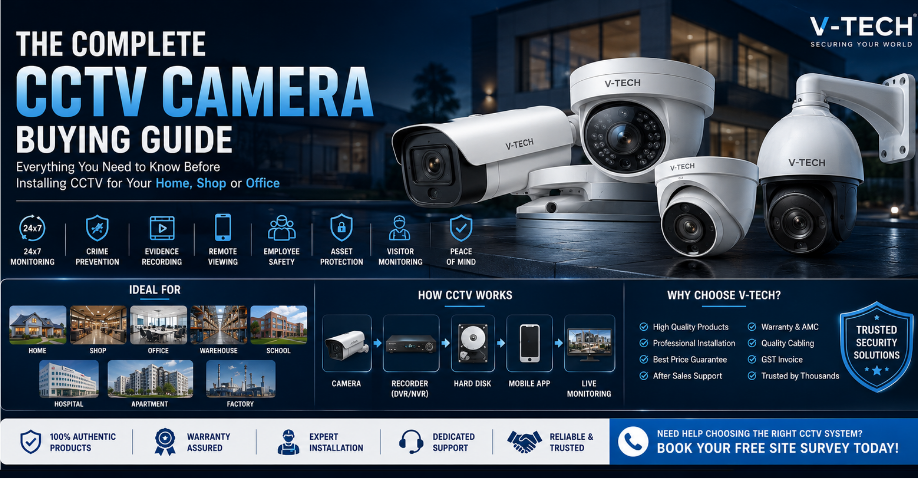
The Complete Guide to CCTV Cameras
Last updated: July 2026 | Written by V-Tech Security Team, Bangalore
Quick Answer
A basic 4-camera home CCTV setup in Bangalore, including cabling, DVR, hard disk and installation, is typically quoted after a free site survey. The right system depends on camera type, resolution, storage needs, and whether you choose wired or wireless.
Table of Contents
- What Is a CCTV Camera and How Does It Work?
- Bullet vs Dome vs PTZ: Which Shape Fits Where
- IP Camera vs Analog Camera
- NVR vs DVR Explained
- How Many Cameras Do You Need?
- Understanding Night Vision
- Camera Resolution Guide
- How Long Does Footage Last?
- Working Without Wi-Fi or Power
- How Installation Actually Works
- Installation Cost in Bangalore
- Checklist Before Hiring an Installer
- Frequently Asked Questions
If you are thinking about installing a CCTV camera for your home, shop, or office in Bangalore, you probably have a dozen questions running through your head. Which type of camera do you actually need? What is the difference between an NVR and a DVR? How many days will your footage last? Will it work when the power goes out?
This guide answers all of that in plain language, without confusing technical jargon. We have installed systems across homes, shops, apartments, warehouses, and offices throughout Bangalore, and this guide reflects what actually matters on real properties, not just spec sheets. By the end, you will know exactly what to ask a dealer, what specifications matter, and what a fair price looks like.
1. What Is a CCTV Camera and How Does It Work?
A CCTV camera is a video camera that continuously records footage of a specific area and sends that footage to a recorder or storage device. Unlike a broadcast camera, the video stays within your own private system, which is why it's called "closed-circuit" television.
A typical CCTV setup has four parts working together: the camera itself, a recorder (NVR or DVR), a storage device (hard disk), and a way to view footage, either on a screen or through a mobile app. Each part plays a specific role. The camera captures light and converts it into a video signal. The recorder compresses that signal and writes it to storage. The hard disk holds the footage until it is either overwritten by new recording or exported for review. Choosing the wrong component anywhere in this chain, an underpowered recorder, a mismatched cable, or an undersized hard disk, can quietly limit your entire system's performance even if the camera itself is excellent.

2. Bullet vs Dome vs PTZ: Which Shape Fits Where
Beyond IP vs analog, cameras also come in different physical shapes, and each shape is built for a specific job. This is one of the most overlooked decisions buyers make, yet it directly affects how useful your footage is later.
- Bullet cameras are cylindrical, mounted on walls, and designed primarily for outdoor use. Their visible shape acts as a deterrent on its own, and they typically offer longer range, often 30 to 80 metres with a varifocal lens, making them ideal for compound walls, gates, and perimeter fencing.
- Dome cameras have a discreet, semi-spherical shape and are usually mounted on ceilings indoors. Because the lens direction is harder to see from outside the dome, they work well in shops, offices, and lobbies where you want coverage without drawing attention to exactly where the camera is pointed. They are also more vandal-resistant due to their compact housing.
- PTZ (Pan-Tilt-Zoom) cameras can be remotely rotated left-right, tilted up-down, and zoomed in digitally or optically. They are the right choice for large open areas like warehouse floors, parking lots, or factory yards, where one camera needs to actively follow movement or zoom in on a specific incident rather than statically watching one fixed frame.
- Turret cameras sit between bullet and dome; they offer a wide-angle view like a dome but with a more flexible, adjustable head, often used for indoor spaces requiring detailed wide coverage.
As a simple rule: use bullet cameras for long-distance outdoor perimeter monitoring, dome cameras for discreet indoor wide-area coverage, and PTZ cameras when you need active control over a large site rather than a fixed frame.
3. IP Camera vs Analog Camera: Which One Do You Need?
This is the first major decision every buyer faces, and it affects every other choice down the line, including which recorder, which cabling, and which app you'll use.
| Feature | Analog (HD) Camera | IP Camera |
|---|---|---|
| Cabling | Coaxial cable | Network (Cat6) or Wi-Fi |
| Image Quality | Good, budget-friendly | Sharper, higher detail |
| Power | Separate power cable per camera | Often powered via PoE (single cable) |
| AI Features | Limited | Face detection, ANPR, human/vehicle detection |
| Best For | Homes, small shops | Jewellery shops, offices, large properties |
| Recorder Needed | DVR | NVR |
For most homes and small shops in Bangalore, a good analog HD system is still cost-effective and reliable, and it remains the most common choice we install for residential customers. If you run a jewellery shop, office, or large property where image detail and AI-based alerts matter, an IP-based system is usually worth the extra cost, since a single PoE cable can carry both power and data, simplifying cabling on larger sites.
4. NVR vs DVR: The Recorder Explained
Both NVR (Network Video Recorder) and DVR (Digital Video Recorder) do the same basic job: take video from your cameras and store it on a hard disk so you can review it later. Both also allow remote viewing through a mobile app once connected to the internet.
The key difference is how they receive the video. A DVR works with analog cameras through coaxial cables, converting the analog signal to digital only at the recorder. An NVR works with IP cameras over a network, receiving footage that is already digital and compressed at the camera itself. Mixing the wrong recorder with the wrong camera type simply will not work, an NVR cannot process a raw analog signal, and a DVR has no network ports for IP cameras, so confirm this compatibility with your installer before any purchase is finalized.
Channel count also matters. Recorders are sold as 4, 8, 16, or 32-channel units, referring to the maximum number of cameras they can support. Always buy slightly above your current camera count so you have room to expand later without replacing the recorder.
5. How Many Cameras Do You Actually Need?
This depends entirely on your property's layout, entry points, and risk areas, not on what a dealer wants to sell you.
- Independent house (30x40 site): 4 cameras usually covers the main gate, compound, front door, and one internal common area.
- 2-3 BHK apartment: 2 cameras are often enough — main door and living area, since common areas are typically covered by the building's own system.
- Small shop: 4 cameras typically cover the entrance, billing counter, main aisle, and stockroom.
- Jewellery showroom: Every counter individually, plus entrance and safe room, often 8 or more high-resolution cameras.
- Warehouse or factory: This genuinely needs a site survey rather than a guess, since coverage depends on ceiling height, rack layout, and loading bay count.

Red Flag to Watch For: If a dealer pushes an 8-camera setup on a small 2BHK without visiting first, that's a sign to look elsewhere.
6. Understanding Night Vision
Almost every camera today claims "night vision," but quality varies enormously, and this is one area where cheap cameras disappoint owners the most.
- IR (Infrared) night vision: Produces black-and-white footage at night by emitting infrared light invisible to the human eye. Works well for most homes and shops, and is the more affordable option. IR range is usually specified in metres; the higher the number, the further the camera can see clearly in darkness.
- Full-colour night vision: Uses a more sensitive sensor, sometimes combined with a small built-in warm light, to capture colour footage even in low light. This is useful for reading clothing colour or vehicle colour in incident footage, something black-and-white IR footage cannot provide. It costs more but gives far more usable detail during an actual investigation.
For a compound wall or main gate where identifying a person or vehicle matters, full-colour night vision is worth the upgrade. For internal rooms or basic motion monitoring, standard IR night vision remains perfectly sufficient.
7. Camera Resolution: 2MP, 5MP or 4K?
Resolution determines how much detail your footage captures, but higher resolution also means larger file sizes and faster-filling storage.
| Resolution | Best Use Case |
|---|---|
| 2MP | Basic monitoring, distant faces not critical |
| 5MP | Good middle ground for most homes and shops |
| 4K (8MP) | Jewellery shops, cash counters, large open areas |
A good practical approach is to use higher resolution only at critical points, entrances, counters, and cash-handling areas, while using standard 2MP or 5MP for general hallway or compound coverage. This keeps storage costs manageable without sacrificing detail where it matters most.
8. How Long Does CCTV Footage Actually Last?
Storage duration depends on three things: hard disk size, number of cameras, and resolution chosen. As a rough example, a single 1TB hard disk with four 5MP cameras recording continuously usually holds around 15 to 20 days of footage, though this varies based on compression format, H.265 stores roughly 50 percent more efficiently than the older H.264 standard for the same video quality.
If you need longer retention for insurance or legal purposes, such as jewellery showrooms that often require 90 days of storage, you can add a bigger hard disk, reduce resolution slightly on non-critical cameras, switch to motion-triggered recording instead of continuous recording, or add cloud backup as a secondary redundant layer.
9. Can CCTV Work Without Wi-Fi or During a Power Cut?
Yes, and this is a common misunderstanding. A basic wired CCTV system records locally to its own hard disk and does not need internet to function at all. Wi-Fi or internet is only required if you want to view footage remotely on your phone from outside the property.
For power cuts, most systems stop recording unless backed by a UPS (uninterruptible power supply). Given how common power interruptions are in parts of Bangalore, especially during monsoon season, we recommend at least a basic UPS backup rated for 1 to 2 hours for any serious setup, especially for main entrances and cash counters where a gap in coverage matters most.

10. How Installation Actually Works
A proper installation is not just mounting a camera and plugging in a wire. A professional job typically follows this sequence:
- Site survey: The installer walks the property, identifies entry points, blind spots, lighting conditions, and existing cable routes.
- System design: Camera count, type, and placement are finalized based on the survey, not a fixed package.
- Cabling: Coaxial or Cat6 cable is routed, ideally concealed through conduits or false ceilings, with proper junction boxes for outdoor runs.
- Mounting and power: Cameras are mounted at the correct height and angle, and power is connected either directly or via PoE.
- Recorder setup and testing: The NVR/DVR is configured, each camera feed is tested, and recording schedules are set.
- Mobile app setup and handover: The owner is walked through the mobile app, given login credentials, and shown how to review footage.
Skipping the survey step is the single most common reason customers end up with blind spots, glare-affected footage, or wiring that looks messy and gets damaged over time.
11. What Does CCTV Installation Cost in Bangalore?
Pricing depends on camera count, camera type, resolution, cabling distance, and recorder specifications. Exact pricing should always come from a site survey, since cable length and mounting complexity affect the final number significantly, a ground-floor shop with short cable runs costs far less to wire than a three-storey villa with a large compound. Be cautious of quotes given over the phone without a visit; they are often revised upward once installation begins and unexpected cabling distance becomes apparent.
12. What to Check Before Hiring a CCTV Installer
- Do they offer a free site survey before quoting?
- Do they provide a written quote with GST invoice and warranty terms?
- Do they explain camera placement and why, rather than installing wherever is convenient?
- Do they offer an AMC (Annual Maintenance Contract) or after-sales support?
- Can they show real installation photos or references from your area?
- Do they explain the cabling plan, concealed vs exposed, before starting work?
Frequently Asked Questions
How much does CCTV installation cost in Bangalore?
A standard 4-camera HD home setup, including cabling, DVR, hard disk, and installation, is typically quoted after a free site survey since cable length and mounting requirements affect the final cost.
Which is better, NVR or DVR?
Neither is universally better; it depends on your camera type. DVRs work with analog cameras, and NVRs work with IP cameras.
Can CCTV cameras work without internet?
Yes. Local recording to a hard disk does not require internet. Internet is only needed for remote viewing on a phone.
Can CCTV cameras work during a power cut?
Only if backed by a UPS. Without battery backup, most systems stop recording when the power goes out.
How many days does CCTV footage typically last?
It depends on hard disk size, camera count, and resolution, but a common setup with a 1TB disk and four 5MP cameras usually retains 15 to 20 days.
What is the difference between a bullet and a dome camera?
Bullet cameras are cylindrical and built for long-range outdoor monitoring, while dome cameras are discreet and better suited for wide-area indoor coverage.
Is CCTV footage legally accepted as evidence in India?
Yes, CCTV footage is widely accepted by Indian police and courts as supporting evidence, provided the timestamp and chain of custody are maintained properly.
Not Sure Which Setup Is Right for You?
Every property is different. Get a free, no-obligation site survey and a recommendation based on what you actually need, nothing more.
Book Your Free Site Survey WhatsApp Us